The Only QMS Built on 20 Years of Enterprise LMS Expertise
The gap between a document update and employee training is where most compliance failures begin. eLeaP closes that gap automatically.

The Training Management Problem: Book a Demo
A procedure is revised and approved. Then someone has to work out who needs retraining, assign it, chase it, and prove it was done. When training lives in a separate system, that proof is assembled by hand.
- ❌ Training records siloed from quality system documentation
- ❌ Training gaps are a common source of inspection findings
- ❌ No visibility into who needs retraining when SOPs change
- ❌ No connection between quality events and retraining requirements
The eLeaP Solution:
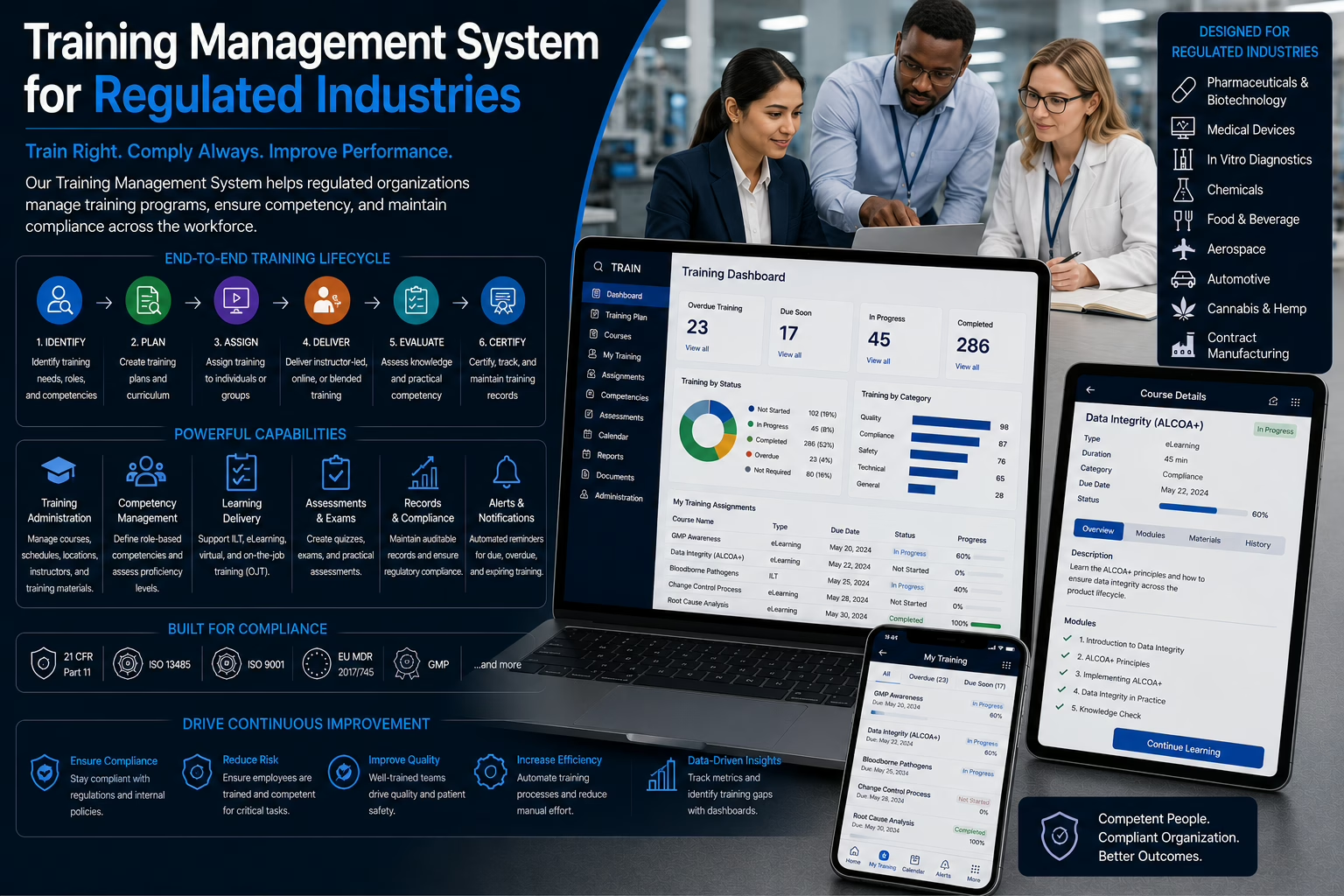
eLeaP’s training management brings the enterprise LMS and the QMS together. Send an Approved or Effective document to training in one click, follow completion from inside the document record, and link quality events to the training that addresses them.
- ✅ An enterprise LMS built into the QMS, with single sign-on from the Learning link
- ✅ Send documents to training, or require training automatically when a document becomes Effective
- ✅ Real-time training stats on the document, with a link to the full LMS report
- ✅ Part 11 electronic signatures on training records
Stop managing training in a separate system that doesn’t talk to your QMS. The Training Management module is built on eLeaP’s 20-year LMS platform, connected to document control and quality events so every employee can be trained on current procedures. Start your free 30-day trial. No credit card required. Get full feature access and implementation support. Or schedule a free session with one of our solution experts.
An Integrated QMS and LMS Platform
eLeaP’s Learning Management module is powered by our comprehensive LMS platform, trusted by more than 1,200 organizations for 20 years. It is a complete learning management system that works directly with your controlled documents, design records, and quality events.
At the core of eLeaP Quality Management Software is its Learning Management module, built on the same platform organizations rely on for mission-critical training. From the document record, you send procedures to training and watch completion in real time. From a CAPA, you link the event to the training record that addresses the gap.
Key Features
-
Send Documents to Training
Push any Approved or Effective document to the LMS with the Send to Training button, or switch on Request training after becoming effective in the document’s settings so training is requested as soon as a document reaches Effective status. A Training tab on the document shows real-time stats and links to the full LMS report.
-
Smart Assigning Rules
Build IF/THEN rules on your custom user fields, such as region, department, or job title, to assign courses, learning paths, or user groups automatically. Rules run in the background for new and edited users, or across all existing users on demand, and conditions can combine with AND and OR.
-
Auto Re-Assignment and Deadline Reminders
Re-assign recurring training on a fixed date or after a set period, for a set number of cycles. Send reminders before a deadline and for up to 14 days after it, once or daily, so overdue training is chased by the system instead of by hand.
-
Course Revisions with Full History
Revise a course to create a new version with a date stamp, edit it while the current version stays in place, then activate it and notify learners. The completion report keeps current and previous completions, with the course name and version, so history stays intact.
-
Part 11 Electronic Signatures
Require an electronic signature for course completion on any course, or turn it on for every course by default. Download the e-signature log, with time stamps and IP addresses, as PDF or Excel. See how e-signatures work in the LMS.
-
Create Courses with AI
Start a course with AI course creation instead of a blank page, then review and refine it in the content editor before you publish.
-
Turn PowerPoint into SCORM
Convert existing PowerPoint presentations into SCORM content, so slide decks you already have become trackable training.
-
Course Authoring and SCORM
Create courses with the built-in content editor, using video, audio, PDF, Microsoft Office files, HTML, and quick quizzes, flip cards, and feedback elements. Import SCORM 1.2 and SCORM 2004 packages, and publish shared lessons from a repository so one update reaches every course that uses them.
-
Quizzes and Grading
Build quizzes from a question bank with time limits, passing score or percentage, retries, randomized questions and answers, and a set mix of easy, medium, and hard questions. Review results by user or in summary, and grade open answers in the Grading Center.
-
Observation Checklists
Assess skills in person with Observation Checklist courses that administrators, coordinators, managers, and supervisors complete for each learner, with reports and downloadable files.
-
Learning Paths
Group courses into learning paths that are simple, pre-set with prerequisites and quiz-gated progression, self-enrolled from an internal catalog, or released on a schedule for long-term programs.
-
Quality Events Linked to Training
Use Related Items to link an event, CAPA, or corrective action to the specific training record that addresses a training gap, and flag actions that need training before they can be verified. See events management.
-
Design Documentation and Batch Records
Design items marked Done can be published to training. In production records, operator entries capture whether training was valid on the production date, a point-in-time snapshot later LMS changes do not alter. See design and development.
What You Get with eLeaP Training Management
-
Role-Based Oversight
Trainees, instructors, supervisors, managers, and coordinators each see what their role needs. Supervisors and managers follow completion for their user groups and receive emails when deadlines for their teams are expiring or have expired, and managers can assign courses and learning paths to their groups.
-
Reports That Come to You
Schedule course completion, non-completion, upcoming non-completion, learning path completion, and user completion percentage reports to be emailed on your timetable, and export results to Excel.
-
Classroom and Instructor-Led Events
Run classroom or instructor-led training with event registration, self-enrollment, capacity limits with pending registrations, and event status reporting.
-
Skills, Certificates, and Credentials
Attach skills to courses and roles, issue branded completion certificates, and track continuing education credits, licenses, certifications, and on-the-job training records.
-
Single Sign-On and Security
Once your account is configured for LMS access, the Learning link in the QMS signs you in automatically. The LMS also supports two-factor authentication, automatic logout, and a platform audit trail filtered by module, action, and IP address.
-
Connect to Your Systems
Use the LMS API and webhooks to send training events to other systems, including Slack.
-
Help Where You Need It
Tutorials cover assigning courses, creating quiz questions, e-signatures, and course deadlines, with a full LMS user guide and support resources.
Why Select eLeaP Quality?
With more than 20 years of LMS experience combined with deep quality system knowledge, eLeaP connects learning and quality in one platform, reducing the manual hand-offs that occur when training and quality systems don’t communicate. Document changes, quality events, and training records stay linked, so training questions can be answered from the records themselves.
-
Send revised procedures to training from the document record
-
Part 11 compliant training records
-
Quality events linked to the training that addresses them
-
One platform for both QMS and LMS needs
Proven Benefits:
-
Audit-Ready Training Records
Show regulators current training records linked to your controlled documents and quality events, with training stats visible on the document itself.
-
Fewer Systems to Maintain
Manage training from a platform built together with your quality processes, without duplicate data entry or spreadsheet tracking between separate systems.
-
Faster Procedure Roll-Out
Revised procedures go from approval to assigned training in one step, with automatic requests available when a document becomes Effective.
-
Closed-Loop Corrective Action
When an investigation finds a training gap, link the corrective action to the training record, so the action and its competency evidence are traceable together.
-
Improved Training Effectiveness
Link training to the quality outcomes it supports, and use recurring root causes in event reporting to see where competency gaps persist.
-
Clear Accountability
Maintain clear records of who was trained on what, and when, to support investigations with complete training history.
The eLeaP Training Management Module is trusted by life sciences companies worldwide as an integrated approach to quality and learning. Take the next step toward connected training compliance. Start your free trial below or schedule a demo today.
The Training Management Module is powered by eLeaP’s comprehensive Learning Management System, serving over 1,200 organizations worldwide.
Training Management FAQs
-
How does a document revision reach training?
Once the revised document is Approved or Effective, click Send to Training, or enable the document setting that requests training automatically when it becomes Effective. See document management.
-
Can I see training status without leaving the QMS?
Yes. Each document sent to training has a Training tab with real-time stats and a link to the full LMS report.
-
Are training signatures 21 CFR Part 11 compliant?
The LMS supports Part 11 compliant electronic signatures on training records. See the tutorial.
-
How do quality events connect to training?
Link an event or corrective action to the training record using Related Items, closing the loop between the issue and the training assigned to address it.
-
Can training be assigned automatically?
Yes. Smart Assigning rules assign courses, learning paths, or user groups based on custom fields, and Auto Re-Assignment repeats recurring training on a schedule you set.
-
Do I need a separate LMS login?
No. After your account is configured for LMS access, the Learning link signs you in automatically.
-
How can we try it?
Explore Related Capabilities
Training works best connected to documents, events, design, and change in one system.
-
Related Modules
Document management
CAPA management
Events management
Change control
Design and development -
Related Solutions
Medical device QMS
Pharmaceutical QMS
Manufacturing QMS
Biotech QMS -
Next Step
See it in a demo
Start a free trial
ISO 9001 eQMS readiness checklist