Design Controls Traceable from User Need to Validation.
Link user needs, design inputs, outputs, verification and validation in one record built on ISO 13485 clause 7.3 and the FDA QMSR, so your design and development file is ready for review.

The Design Controls Problem: Book a Demo
Every medical device team knows what ISO 13485 clause 7.3 asks for: planned design and development, documented inputs and outputs, reviews, verification, validation, transfer and controlled changes, all kept in a design and development file. The hard part is keeping that evidence connected while a product is changing every week.
- ❌ User needs, design inputs, outputs and test results live in separate spreadsheets, documents and tools, so the design and development file is assembled by hand at the end.
- ❌ Traceability maintained by hand falls out of date as soon as a requirement changes, and gaps surface during an audit instead of during development.
- ❌ Verification evidence is hard to tie back to the specific output it proves, and validation is hard to tie back to the user need it answers.
- ❌ Risk files, design reviews and design changes sit outside the design record, so hazards and controls drift away from the requirements they should shape.
- ❌ Teams learn about an updated specification through email or word of mouth, with no training record connected to the design item.
The eLeaP Solution:
- ✅ One connected record from user need to validation: every design input, output, verification and validation is a controlled item with required links to the items above it.
- ✅ A live traceability view that shows which items are missing downstream coverage, and a traceability matrix you can export to Excel whenever you need it.
- ✅ Structured design reviews, controlled changes and the design and development file built from the same record your team works in every day.
- ✅ Risk analysis aligned with ISO 14971:2019, linked to the requirements it influences, so hazards and control measures stay tied to the design.
- ✅ Enterprise Learning Management built in, so approved design records can be sent to training without leaving the platform.
Design controls should be the way your team works, not a binder you build before an inspection. eLeaP Design Controls gives medical device, IVD and SaMD teams a single, traceable workspace organized around ISO 13485:2016 clause 7.3 and the FDA Quality Management System Regulation (QMSR). → Talk to an Expert or start a free trial.
Design Controls Built Around ISO 13485 Clause 7.3
Since February 2, 2026, the FDA’s Quality Management System Regulation incorporates ISO 13485:2016 by reference, which makes ISO 13485 clause 7.3 the common language for design and development controls across the United States, the European Union and the other markets that recognize the standard. One design record can serve all of them.
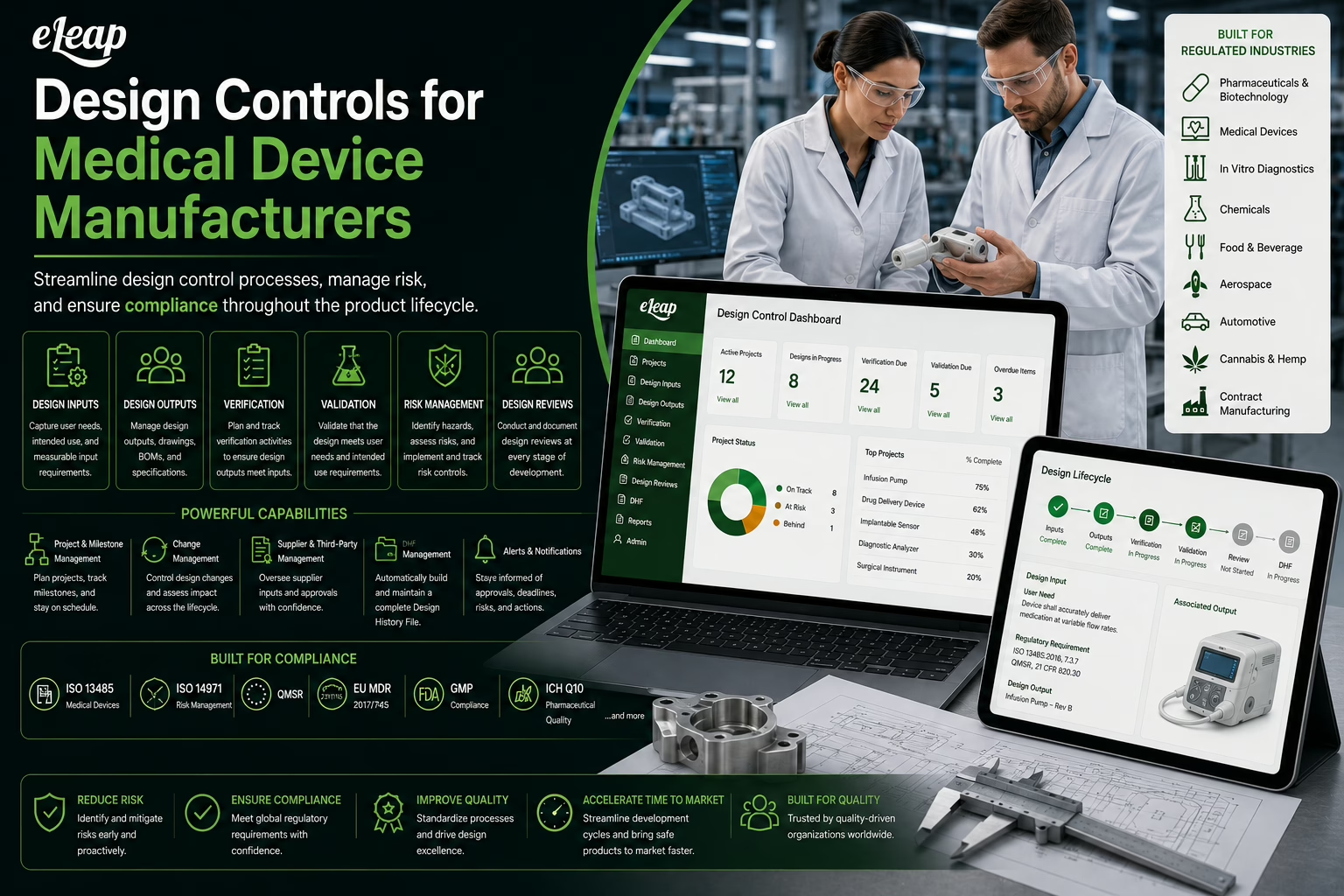
eLeaP Design Controls is the Design module configured for medical devices. It organizes your work into five connected phases: User Needs, Design Inputs, Design Outputs, Design Verifications and Design Validations. Each item has an owner, a status, tasks, comments, linked risks and an activity history, and each item must connect to the right items above it. The result is a design and development file that is built as the work happens, with the traceability already in place when a reviewer, notified body or auditor asks to see it.
Key Features
-
Required Traceability Links
Design inputs link to the user needs they satisfy, outputs link to the inputs they implement, verifications link to the outputs they prove, and validations link back to the user needs they confirm. The links follow the hierarchy, so the structure of your design record reflects the structure the standard describes.
-
Column View and Hierarchy View
Work in a board of cards by phase, or switch to a hierarchy that traces every item back to the needs it supports and highlights missing downstream items. Each card shows status, owner, tags, and quick access to tasks, related items, risks and comments.
-
Design Review Module
Schedule design reviews, add participants and the items under review, assign reviewers and approvers with day limits, track tasks that come out of the review, and keep every review attached to the design record.
-
Verification and Validation Records
Create verification items linked to the design outputs they confirm, with method and acceptance criteria, and validation items linked to user needs. Attach protocols, reports and results through Related Items, and open an event when a result needs investigation.
-
Risk Management Linked to Design
Connect risk analysis to the requirements it affects. The risk module uses the ISO 14971:2019 decomposed probability model, so hazards, hazardous situations, harms and control measures stay tied to the design items that implement them.
-
Controlled Changes
Route modifications to design items through change control, from change request through change order, with the activity history of every design item recording who changed what and when.
-
Design History in One Click
Export the design and development file as a PDF that includes design control items, descriptions, statuses and relationships, design reviews, verification and validation records, an activity summary, the traceability matrix and associated artifacts. The export is labeled Export DHF in the module.
-
Transfer-Ready Records
Export a Device Master Record snapshot of the project’s master specification and a Device History Record snapshot of its execution evidence, alongside the design and development file, to support design transfer into production.
How eLeaP Supports Each Part of ISO 13485 Clause 7.3
The table shows where each design and development element of ISO 13485:2016 lives in eLeaP. It describes how teams use the platform. Your quality manual and procedures define how your organization meets each requirement.
| Clause | Requirement area | In eLeaP Design Controls |
|---|---|---|
| 7.3.2 | Design and development planning | A project for each product with phases configured for your process, owners, tasks, tags and scheduled design reviews. |
| 7.3.3 | Design and development inputs | User Needs and Design Inputs as controlled items, with linked risks, approval workflow and comments. Create them one at a time, import them from Excel, CSV or Word, read them from Confluence, or generate a draft chain with AI. |
| 7.3.4 | Design and development outputs | Design Outputs traced to the inputs they satisfy, with specifications, drawings and other evidence attached through Related Items. Mark an item Done to freeze it for downstream use. |
| 7.3.5 | Design and development review | The Design Review module: participants, reviewed items, reviewers and approvers, tasks, comments and an activity history for every review. |
| 7.3.6 | Design and development verification | Design Verifications linked to the outputs they prove, with method and acceptance criteria, and results attached as evidence. |
| 7.3.7 | Design and development validation | Design Validations linked to the user needs they confirm, with the validation evidence attached to the record. |
| 7.3.8 | Design and development transfer | Device Master Record and Device History Record exports, plus the full DMR and DHR records in the Projects module. |
| 7.3.9 | Control of design and development changes | Design items revert from Done to Draft only when a change is needed, and modifications route through the Change Control module with a complete activity history. |
| 7.3.10 | Design and development files | One-click PDF export of the design and development file, including the traceability matrix, reviews and V&V records. |
What You Get with eLeaP Design Controls
-
A Workspace Named for Medical Devices
Choose Medical Device as your industry and the module appears as Design Controls, with the phases and exports medical device teams expect. Each project can carry its own industry selection and its own phase configuration, so different product lines can follow different processes.
-
Generate a Traced Chain with AI
Describe your device, who uses it and its intended use, then select the standards that apply, such as ISO 13485, QMSR, ISO 14971, IEC 62304 or EU MDR 2017/745. eLeaP drafts a chain from user needs through design inputs, outputs, verifications and validations. Every item arrives as a Draft that your team edits, reviews and approves.
-
Bring Your Existing Requirements In
Already have requirements in Excel, CSV or a Word table? Import from File gives you a template built from your project’s own phases, then creates the items already traced to their parents. Re-import the file with the same IDs to refine the wording of items that are still in Draft. eLeaP also reads requirements tables from Confluence pages every hour, and an external requirements tool can create draft items through the eLeaP API. In every case, a named person takes the items through review and approval in eLeaP.
-
Review and Approval You Can Trace
Each design item has an approval workflow tab that shows approvers, status and routing progress, together with comments, tasks and a full activity history of edits, status changes and relationship changes.
-
Frozen Records, Then Training
Mark an item Done to freeze it and approve it for downstream use. When an item is applicable, send it to the training module so the people who build, test and support the device learn from the approved record.
-
A Readiness Dashboard
See total requirements, items not yet verified or validated, status across Draft, In Review and Done, design review progress, the highest-risk item and a risk acceptability matrix in one view.
-
Design Records That Link to Everything Else
Related Items connects a design requirement to documents, risk items, control measures, events, uploaded files and external URLs, so the evidence behind a decision is one click from the decision.
From User Need to Validation: How Traceability Works
-
1. User Needs
Capture what users, patients and clinicians need the device to do, written from their point of view. User needs are the top of the chain and have no upstream items.
-
2. Design Inputs
Translate each need into measurable requirements. Every design input links to one or more user needs, so no requirement exists without a reason.
-
3. Design Outputs
Record the specifications, drawings, software builds and procedures that meet the inputs. Every output links to the design inputs it implements.
-
4. Design Verifications
Show that outputs meet inputs. Each verification links to the design outputs it confirms and carries its method, acceptance criteria and results.
-
5. Design Validations
Show that the finished device meets the user needs. Each validation links to the user needs it confirms, closing the loop from the first requirement to the final evidence.
Why Select eLeaP Quality?
eLeaP Design Controls is part of a complete medical device quality management system that includes document control, risk management, change control, CAPA, supplier management and enterprise Learning Management. Design records do not sit in a standalone tool. They share one platform, one audit trail and one set of roles with the rest of your quality system.
Start Your Free 30-Day Trial. No Credit Card Required
|
Standards Supported ISO 13485:2016 | FDA QMSR |
Built For Medical Device Manufacturers |
Developing in Another Regulated Industry?
The same module adapts to other industries. See the Design & Development System for pharmaceutical, biotech, aerospace, automotive and food and beverage teams.
-
Keep every requirement connected to the need it serves and the evidence that proves it
-
Build the design and development file as you work, so the record is ready when it is requested
-
Tie risk, review, change and training to the same design record
-
Give R&D, quality and regulatory teams one shared view of design status
Proven Benefits:
-
Audit-Ready Design History
Reviewers, notified bodies and auditors can follow any requirement from user need to validation, with reviews, approvals and activity history attached. The design and development file exports as a PDF from the same record your team maintains daily.
-
Fewer Surprises at Review
Required links and a hierarchy view that highlights missing downstream items help teams find coverage gaps while the design is still open, not at the end of development.
-
Risk and Design Move Together
Hazards and control measures are linked to the requirements they influence, so a change to one points the team to the other.
-
Controlled, Documented Change
Frozen Done items, a defined path back to Draft, change control and a complete activity history give design changes a clear, reviewable trail.
-
Faster Starts with Imports and AI Drafts
Import requirements you already have, or let AI draft a traced chain from a product description, and put your team’s time into reviewing and refining instead of retyping.
-
Cross-Functional Collaboration
R&D, quality, regulatory, manufacturing and clinical teams work in the same record with role-based access, tasks, comments and notifications.
Take the next step toward design controls that stay connected from the first user need to the final validation. Start your free trial below or schedule a demo today.
Design Controls is part of the comprehensive eLeaP Quality Management System.
Design Controls FAQs
-
What standard governs design controls for medical devices now?
The FDA’s Quality Management System Regulation (QMSR) took effect on February 2, 2026 and incorporates ISO 13485:2016 by reference. Design and development requirements now follow ISO 13485 clause 7.3, covering planning, inputs, outputs, review, verification, validation, transfer, changes and the design and development file. The same clause is the basis for design controls under EU MDR and MDSAP programs.
-
Is the design history file still required?
ISO 13485 calls it the design and development file, and QMSR uses that language. Many teams still say DHF, and eLeaP’s export keeps that familiar label while collecting the same content: design items, reviews, verification and validation records, the traceability matrix and associated artifacts.
-
How does eLeaP maintain traceability?
Each item must link to the right items above it: design inputs to user needs, outputs to inputs, verifications to outputs and validations to user needs. A hierarchy view highlights missing downstream items, and the traceability matrix exports to Excel with one row for each complete path.
-
Can we bring in requirements we already have?
Yes. Import from File accepts Excel, CSV and Word tables up to 10 MB and creates draft items already traced to their parents. eLeaP can also read requirements tables from Confluence every hour, and an external tool can create draft items through the eLeaP API. Review and approval stay with named people in eLeaP.
-
How are risk and design connected?
Each design item carries its linked risks. The risk management module follows ISO 14971:2019 and links hazards, hazardous situations, harms and control measures to the requirements they influence.
-
Does it support software as a medical device?
Yes. SaMD teams can select IEC 62304 and ISO 14971 as regulatory context when generating a draft chain, import requirements from tools such as Confluence, and keep software requirements, verification evidence and risks in the same traceable record.
-
How can we try it?
Start a free trial or book a demo with one of our solution experts.
Explore Related Capabilities
Design controls work best connected to risk, change, documents and training in one system.
-
Related Modules
Risk management
Change control
Document management
Training management
CAPA management -
Related Solutions
Medical device QMS
Design & development for other industries
Quality management system -
Next Step