FMEA Software for DFMEA and PFMEA Built for Regulated Industries
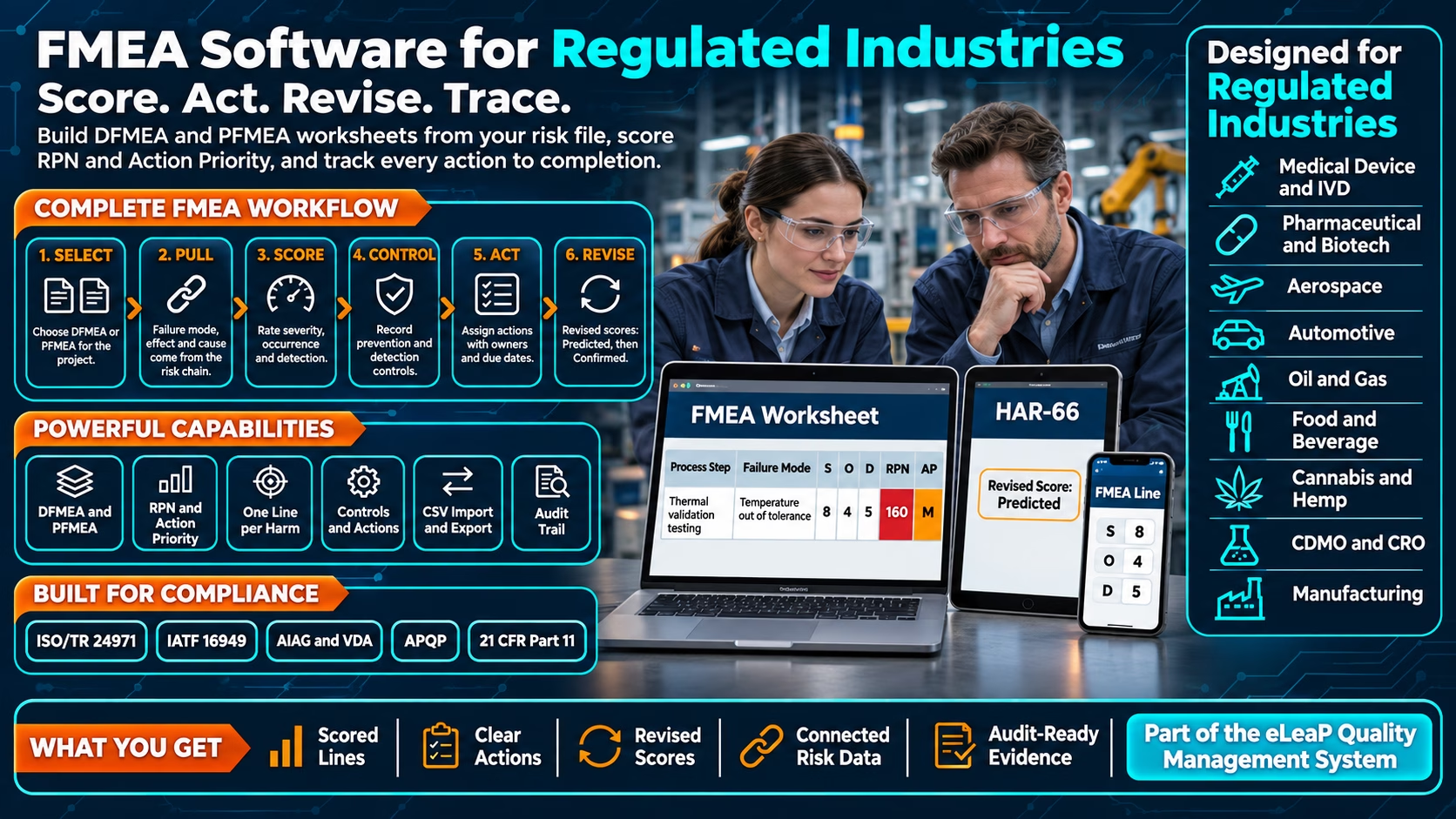
Build DFMEA and PFMEA worksheets from your risk file and track every action to completion.

The FMEA Problem: Book a Demo
FMEA is where teams decide which failures matter most and what to do about them. It is also where auditors and customers ask how a score was reached and whether the action actually worked. When the analysis lives outside the quality system, that answer is hard to rebuild.
- ❌ Failure modes, effects and causes are retyped from the risk file into a separate spreadsheet, so the two records drift apart.
- ❌ Severity, occurrence and detection scores change with no record of who changed them or why.
- ❌ Recommended actions are tracked in a different tool from the analysis that raised them.
- ❌ Nobody knows a line needs another look after an event or corrective action closes.
- ❌ Every revision becomes another version of the file, and the history behind each score is lost.
The eLeaP Solution:
- ✅ One controlled FMEA worksheet per project, for a design (DFMEA) or a process (PFMEA).
- ✅ Failure mode, effect and cause drawn from the risk chain, with one line for each harm.
- ✅ Severity, occurrence and detection scored on a 1 to 10 scale, with RPN, Action Priority or both.
- ✅ Prevention controls, detection controls and recommended actions with owners, due dates and statuses on every line.
- ✅ Revised scores that show the effect of completed actions, and a re-score prompt when a linked event closes.
- ✅ Import, export and an audit trail that records old and new values.
Give every FMEA a controlled home. eLeaP FMEA scores design and process risk in the same system that holds the risk file, events and corrective actions behind it. → Talk to an Expert or start a free trial.
FMEA Worksheets for Design and Process Risk, Scored and Traced
FMEA is a recognized risk analysis method across regulated industries. ISO/TR 24971, the guidance for ISO 14971, describes it among the techniques for analyzing medical device risk, IATF 16949 and APQP expect design and process FMEAs for automotive products, and the AIAG and VDA FMEA Handbook defines the Action Priority method. Whatever the industry, reviewers look for the same things: a documented analysis, a reasoned score, actions with owners, and a record of what changed.
eLeaP FMEA sits inside the Risk module. Turn on Use FMEA for a project and each harm in your risk file becomes a worksheet line. The failure mode, effect and cause come from the hazard, foreseeable event and hazardous situation you already recorded, so the analysis starts from your risk file instead of a blank sheet.
Key Features
-
DFMEA and PFMEA Worksheets
Choose a design or a process FMEA for each project. Add a worksheet header with the details your organization uses and choose the columns you want to see. The FMEA type and the scoring scale lock once a line has been scored, so scores stay comparable.
-
One Line for Every Harm
Each harm in the risk chain is a worksheet line. The failure mode, effect and cause are pulled from the hazard, foreseeable event and hazardous situation behind it, so the analysis and the risk file describe the same thing.
-
Severity, Occurrence and Detection
Score each line on a 1 to 10 scale. eLeaP calculates the RPN as severity times occurrence times detection and flags lines at or above your threshold, which defaults to 100.
-
RPN, Action Priority or Both
Choose the rating method that fits your procedures: RPN, Action Priority following the AIAG and VDA approach, or RPN and Action Priority together.
-
Prevention and Detection Controls
Record the controls that prevent the cause and the controls that detect it, next to the scores they support.
-
Recommended Actions with Owners
Recommended actions come from your control measures. Each has an owner, a due date and a status, so follow-up is tracked on the line that raised it.
-
Revised Scores, Predicted then Confirmed
Revised scores show the expected effect of implemented actions. They stay Predicted until the actions are in Monitoring, then become Confirmed.
-
Re-score Prompts After Events Close
When an event linked to a line is closed, the line shows a re-score chip, so what you learn in operation reaches the analysis instead of waiting for the next review.
-
Import from CSV with Preview
Bring an existing analysis into eLeaP from a CSV file of up to 1,000 rows and 5 MB. Rows are created or updated by Reference ID, a preview flags problems before anything changes, and the import is signed with your e-signature.
-
Export to CSV or PDF
Export the worksheet for a design review, a customer request or an audit.
-
Audit Trail with Old and New Values
Every score, control and action change is captured with the old and new values, who made it and when. Imports are recorded as well.
What an FMEA Draws On
An FMEA is only as good as the data it starts from and the follow-up it drives. The inputs and outputs of the analysis already live in eLeaP modules, so the worksheet is connected to the records around it. The table shows where each one lives. Your procedures define how your organization scores and what it acts on.
| FMEA input or output | Where it lives in eLeaP |
|---|---|
| Hazards, foreseeable events and hazardous situations | Risk management: the risk chain that supplies each line’s failure mode, effect and cause. |
| Harms | Risk management: each harm becomes one worksheet line. |
| Prevention and detection controls | The FMEA worksheet, recorded next to the scores they support. |
| Recommended actions | Risk management control measures, with owner, due date and status. |
| Events and corrective actions that change a score | Events and CAPA: a closed linked event prompts a re-score. |
| Review of the analysis | Meetings: design reviews and management reviews that draw on the FMEA. |
| History of every change | The audit trail, with old and new values. |
What You Get with eLeaP FMEA
-
One Worksheet per Project
Each project has its own FMEA, with its own type, scale, threshold and rating method, so a design analysis and a process analysis never share settings by accident.
-
Failure Modes from the Risk File
Because failure modes, effects and causes are drawn from the risk chain, a change to the risk file and the FMEA that depends on it stay in the same system.
-
Your Threshold, Your Method
Set the RPN threshold that matches your procedures and choose RPN, Action Priority or both. Lines at or above the threshold stand out in red.
-
Existing Analyses Come With You
Import the analyses you already have from a CSV file, check the preview, and sign the import. Update lines later by Reference ID.
-
Roles and Access You Already Use
FMEA follows the same roles and permissions as the rest of the platform, with every change captured in the audit trail.
Why Select eLeaP Quality?
FMEA is most valuable when it connects to the data it analyzes. eLeaP brings document control, risk, events, CAPA, design controls, change control and Learning Management into one platform, so the records behind an analysis are already in the same system as the analysis itself.
Start Your Free 30-Day Trial. No Credit Card Required
|
Methods and References ISO/TR 24971 (ISO 14971 guidance) |
FMEA Capabilities DFMEA and PFMEA |
-
Start every FMEA from the failure modes, effects and causes in your risk file
-
Score, justify and revise with a complete history of every change
-
Track recommended actions to completion on the line that raised them
-
Show reviewers how a priority was reached and whether the action worked
Proven Benefits:
-
An Analysis That Starts from Your Risk File
Failure modes, effects and causes are pulled from the risk chain, so teams spend their time scoring and deciding instead of retyping.
-
Scores You Can Explain
Severity, occurrence and detection, the controls behind them and every change are on the record, so you can show how a priority was reached.
-
Actions Tracked to Completion
Owners, due dates and statuses sit with the line that raised the action, and revised scores show what the action is expected to achieve.
-
Evidence Back into the Analysis
A closed linked event prompts a re-score, so what you learn in operation reaches the FMEA.
-
Fewer Tools to Reconcile
The worksheet, its controls, its actions and the risk file behind it are in one platform instead of a spreadsheet and a tracker.
-
Flexible for Your Procedures
Use RPN, Action Priority or both, set your own threshold and choose the columns your reviews need.
Take the next step toward an FMEA that stays connected to your risk file. Start your free trial below or schedule a demo today.
FMEA is part of the comprehensive eLeaP Quality Management System.
FMEA FAQs
-
Does eLeaP support both DFMEA and PFMEA?
Yes. You choose a design or process FMEA for each project. The FMEA type and the scale lock once a line has been scored.
-
Can I use Action Priority instead of RPN?
Yes. The rating method can be RPN, Action Priority, or RPN and Action Priority together. The RPN threshold defaults to 100 and can be changed.
-
Where do failure modes, effects and causes come from?
They are pulled from the risk chain: the hazard, the foreseeable event and the hazardous situation behind each harm. Each harm is one worksheet line.
-
How do revised scores work?
When recommended actions are implemented, the revised scores show their expected effect. They are Predicted until all counted actions are in Monitoring, and then Confirmed. Only Implemented and Monitoring actions count, and an action can improve only occurrence or detection.
-
Can I import an existing FMEA?
Yes. Import a CSV of up to 1,000 rows and 5 MB. Rows are created or updated by Reference ID, a preview flags problems before anything changes, and the import requires an e-signature.
-
Can I export the worksheet?
Yes, to CSV or PDF.
-
Is every change recorded?
Yes. The audit trail captures score, control and action changes with old and new values, and records imports.
-
How can we try it?
Start a free trial or book a demo with one of our solution experts.
Explore Related Capabilities
FMEA works best connected to the risks, events and reviews around it.
-
Related Modules
Risk management
Design controls
Events management
CAPA management
Meetings -
Related Solutions
Medical device QMS
Manufacturing QMS
Quality management system -
Next Step
See it in a demo
Start a free trial
ISO 9001 eQMS readiness checklist